Your 2024 One Page Calendar Design Template
There’s a unique satisfaction in seeing the entire year laid out before you. Not scattered across twelve pages or hidden in a digital app, but captured in a single, cohesive design. A one-page calendar is more than a planning tool; it’s a statement piece, a brand touchstone, and a daily source of inspiration. As we look ahead, having a versatile and professionally crafted 2024 One Page Calendar Design Template at your fingertips isn’t just convenient—it’s a strategic advantage for staying organized and visually consistent.
Beyond the Grid: Why a One-Page Calendar is a Design Powerhouse
The appeal of a one-page calendar lies in its immediacy and impact. It transforms a functional item into a piece of art or a core brand asset. Imagine hanging a beautifully designed calendar in your studio, office, or home. It serves as a constant visual anchor for your goals, campaigns, and milestones. For designers and entrepreneurs, this template isn’t just about marking dates. It’s a foundational element for brand identity and visual communication.
Consider its applications. A freelance graphic designer can customize it with their client’s color palette and logo, creating a thoughtful end-of-year gift that reinforces their brand relationship. A small business owner can use it as a premium giveaway for loyal customers, ensuring their brand is visible every single day. Content creators and bloggers can develop themed calendars—like a “Content Creation Calendar” or a “Wellness Tracker”—to offer as a valuable digital download to their audience. The possibilities extend into marketing assets, editorial layouts, and even packaging design inserts for product launches scheduled throughout the year.
Unpacking the Features: A Tool Built for Professional Use
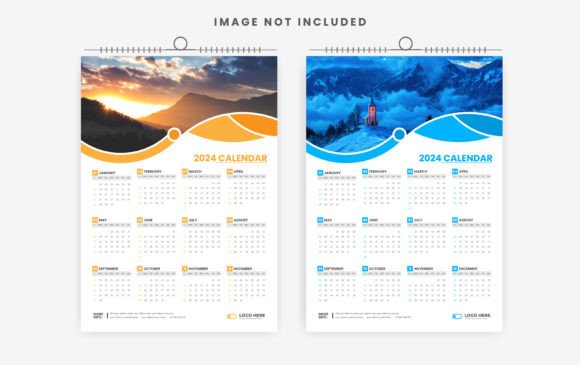
A template’s value is in its details. This particular 2024 One Page Calendar Design Template is engineered for seamless integration into professional workflows. The 300 DPI print-ready resolution and A3 print size (11.69” x 16.54”) with bleeds mean your final output will be crisp and production-ready, whether you’re printing a single poster or a batch for an event. The inclusion of Adobe Illustrator (AI) and EPS CC files provides true editability. You’re not just changing colors; you have full control to adjust typography, restructure layouts, and incorporate custom illustrations or logo design elements.
Speaking of typography, the use of free fonts is a significant practical benefit. It eliminates licensing headaches and additional costs, allowing you to customize and distribute the final calendar without legal concerns. This is especially crucial for commercial projects and client work. The RGB color mode is optimized for digital screens, perfect for sharing on social media graphics, websites, and blogs, while the high-resolution file ensures it can be converted to CMYK for physical prints without quality loss.
From Concept to Execution: Practical Customization Tips
Getting started is straightforward, but a few strategic choices will elevate your final product. First, define the calendar’s purpose. Is it for personal use, a client project, or a product for your online store? This will guide your design decisions.
- Align with Brand Aesthetics: If this is for a brand, pull the primary and secondary color palettes directly from the style guide. Swap the placeholder logo with the official vector file. This ensures the calendar feels like a natural extension of the brand’s other design assets, from website banners to packaging.
- Typography for Tone: The template’s editable nature means you can experiment with font pairings. A clean sans serif font for the month headers paired with a simple, highly readable serif for the dates can create a modern, professional look. For a more artistic or boutique brand, integrating a subtle script font for the year “2024” can add a touch of elegance without sacrificing readability for the grid itself.
- Test for Readability: Zoom out and view the calendar at its intended print size. Are the date numbers clear from a few feet away? Is there enough contrast between the text and background? For digital use, test it on both a desktop monitor and a mobile screen to ensure legibility.
- Add Functional Layers: Don’t be afraid to customize beyond cosmetics. You could add subtle icons for holidays, use a lighter tint to highlight weekends, or incorporate a small key for color-coded categories. This turns a static template into a dynamic planning tool.
Strategic Applications Across Industries
The true power of this resource is its adaptability. A marketing professional might use it to map out campaign timelines and social media schedules, sharing a branded version with their team for unified focus. An entrepreneur could design a limited-edition calendar as part of a merchandise line, pairing it with other branded stationery.
For those in the creative space, it’s a blank canvas. A photographer could create a calendar featuring their best work from the past year. A content creator could design a “2024 Reading Challenge” calendar for their book-focused community. The template’s structure supports both minimalist designs, with ample white space, and more complex layouts incorporating imagery and decorative elements from a premium font or illustration library.
Final Thoughts on Visual Cohesion and Utility
In a world of fragmented digital notifications, a physical, beautifully designed one-page calendar offers a moment of clarity and intentionality. It’s a tool that marries form and function. By starting with a robust, editable template like this, you bypass the technical hurdles of layout and print specifications and dive straight into the creative and strategic process. Whether it’s hanging on a wall, pinned to a corkboard, or displayed as a digital product on a screen, it serves as a constant, cohesive visual reminder of the year’s potential. It’s a small investment of time that pays dividends in organization, brand reinforcement, and daily inspiration.