Green Saliva 3D Text Effect: A Fully Editable Vector for Bold Design
Imagine needing a headline that doesn't just sit on the page but lunges off it, dripping with personality and digital energy. You're designing a poster for an urban music festival, crafting the cover for a gritty video game, or creating social media assets for an eco-conscious brand that wants to show its wild side. Standard fonts feel flat. Stock text effects are rigid and impossible to customize. This is where a specific type of design asset transforms the creative process: a fully editable, high-impact 3D text effect. The Green Saliva 3D Text Effect Editable is precisely this kind of tool, offering a unique, visceral aesthetic combined with the practical flexibility that modern creators demand. It’s not just a static image; it’s a starting point for unlimited visual exploration.
Beyond Flat Typography: Understanding the Visceral Appeal
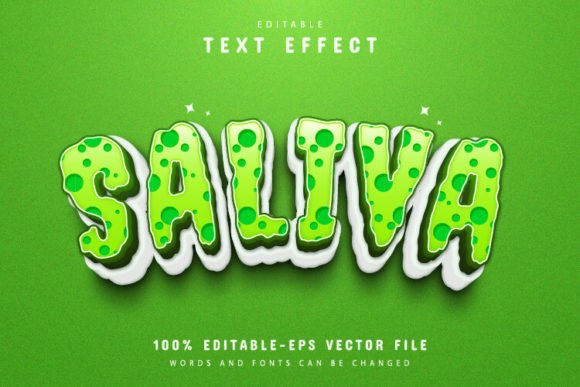
At its core, this design asset is a vector-based text effect that simulates a slimy, glossy, three-dimensional form in a vibrant green hue. The visual language speaks to themes of nature, toxicity, futurism, and playful grotesqueness. Unlike a simple font, it provides depth, texture, and a strong material presence. The "visceral" quality comes from its implied wetness and organic form, making it perfect for projects that need to evoke a strong sensory reaction. Think of the branding for a streetwear line, the title sequence for a sci-fi animation, or the packaging for a novelty energy drink. The effect grabs attention because it feels tangible, almost as if you could reach out and feel its surface.
The true power, however, lies in its editability. Being a fully editable vector file (provided in EPS format for Adobe Illustrator) means you are not locked into the initial design. You can scale it to the size of a billboard or shrink it for a business card without any loss of quality—a fundamental requirement for professional branding work. More importantly, you have complete control. The text itself is fully editable. You can type any word, phrase, or letterform you need. This transforms it from a one-time-use graphic into a versatile component of your design toolkit, adaptable for logos, headlines, and recurring brand elements.
Practical Applications: Where This Effect Makes an Impact
The utility of a customizable 3D text effect spans numerous creative fields. Its unique character makes it a standout choice for specific applications where memorability is key.
For branding and logo design, this effect can establish a bold, unconventional identity. A small business in the alternative fashion, gaming, or outdoor adventure space could use it to create a logotype that instantly communicates its ethos. It’s particularly effective for brands targeting a younger, visually savvy audience that appreciates edgy, graphic-heavy aesthetics.
In packaging design, shelf appeal is everything. A product name rendered in this dripping, luminous green effect would stand out dramatically on labels for drinks, snacks, or cosmetic products aiming for a futuristic or "extreme" vibe. The vector format ensures the design prints crisply at any resolution.
Digital creators and marketers can leverage this effect for high-engagement social media graphics. A YouTube thumbnail, Instagram story, or TikTok cover using this text will cut through the noise of a crowded feed. It’s also ideal for designing eye-catching merchandise—think t-shirts, hats, and stickers for artists, podcasters, or online communities. For event promotion, it can create unforgettable posters and digital flyers for concerts, festivals, or product launches.
Integrating a Bold Typeface into Your Design Workflow
Adopting a highly stylized effect like this requires some strategic thought to ensure it enhances rather than overwhelms your project. Here’s how to approach it effectively.
First, consider your project's core message. Does "Green Saliva" align with the tone? It’s perfect for energy, disruption, nature, tech, or playful edginess. It might be less suitable for a corporate law firm or a delicate bakery, where a classic serif or gentle script font would be more appropriate. Matching the typography personality to the brand personality is the first rule of effective visual communication.
Next, focus on font pairing. A display effect like this should rarely be used for body text. Its strength is in headlines, titles, and single impactful words. Pair it with a clean, neutral sans-serif font (like Helvetica, Arial, or Open Sans) for supporting text. This creates a hierarchy where the bold effect commands attention, and the simple font ensures readability for longer paragraphs. You might also pair it with a gritty, hand-drawn script for a cohesive, edgy feel in certain contexts.
Readability is paramount. Even the most creative font fails if people can’t read the word. Test your chosen phrase at the intended size. The 3D effect can sometimes obscure letterforms, especially with complex characters. Simpler, shorter words often work best. The editability allows you to adjust the text until it’s both visually stunning and legible.
Finally, explore the color variations. While the default is a striking green, the editable vector file allows you to change the color scheme entirely. Adapt it to match a client's brand palette, or create multiple versions for different campaign themes. This level of customization is what separates premium design assets from static, one-note downloads.
From Download to Design: A Seamless Creative Process
Getting started with this asset is designed to be straightforward, requiring no advanced technical skills. The download typically includes the essential EPS file for full editing in Adobe Illustrator and a high-resolution JPG for quick previews or use in software that doesn't support vector editing.
The editing process in Illustrator is simple: open the file, select the Type Tool (by pressing "T" on your keyboard), click on the existing text, and type your new word. The 3D effect is applied as a live appearance attribute, so it automatically updates to your new text. You can then use Illustrator’s color panels to adjust the fill, gradient, and lighting to your exact specifications. This ease of use makes it accessible to everyone from seasoned designers to small business owners managing their own marketing materials.
When downloading any design resource, always review the licensing terms. Ensure the license covers your intended use, whether it's for personal projects, client work, or commercial products like merchandise. Most reputable sources provide clear information on what is permitted, giving you the confidence to use the asset professionally.
In a landscape saturated with generic visuals, a distinctive typographic element can be the difference between blending in and being remembered. A tool like the Green Saliva 3D Text Effect Editable provides a potent combination of unique visual impact and practical, professional-grade flexibility, empowering you to bring a specific, high-energy vision to life across any medium.