Clean Lines, Clear Choices: The Power of a Minimalist Pricing Table
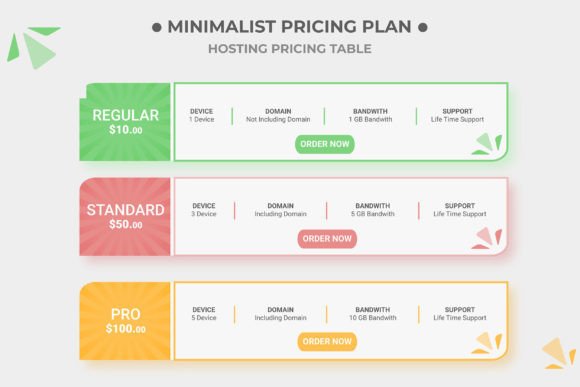
When you're presenting your services or products, clarity isn't just nice to have—it's essential for conversion. A cluttered pricing page can overwhelm potential customers, causing them to hesitate or click away entirely. That's where the beauty of a minimalist design philosophy comes into play, stripping away the unnecessary to highlight what truly matters: the value you offer and the decision your customer needs to make. A well-structured, visually clean pricing table does more than just list numbers; it guides the eye, establishes credibility, and reflects the professionalism of your brand. This particular design asset, built entirely with scalable Illustrator vector shapes, provides a versatile foundation for anyone looking to present their pricing with elegance and impact.
Why Vector Flexibility Changes Everything
The core of this asset's utility lies in its construction. Every element is an Illustrator vector shape, which means you're not working with a static image. You can scale the entire table to fit a massive trade show banner or shrink it down for a mobile app interface without a single pixel of quality loss. This scalability is crucial for maintaining a consistent brand identity across all touchpoints. Furthermore, the fully organized layer panel means you're never digging through a mess to find the "Basic" column or the "Featured" highlight color. Need to adjust the color scheme to match a client's brand guidelines? Simply select the shape and change the fill. Want to add a fourth pricing tier for an enterprise plan? Duplicating and modifying a column takes seconds. This level of control transforms the file from a simple template into a dynamic component of your design system.
Practical Applications for Real-World Projects
Think beyond the traditional SaaS pricing page. This minimalist table template is a multi-purpose tool for a variety of creative and commercial projects. For a freelance designer, it can be adapted into a clear rate sheet for proposals and client PDFs. Small business owners can use it to create professional service menus for their websites or printed brochures. It’s equally effective for designing comparison charts for blog content, helping readers understand the differences between product options or software tools. The clean aesthetic makes it suitable for editorial layouts in magazines or annual reports where data presentation needs to be both beautiful and digestible. Even for digital products like online courses or membership sites, a well-designed pricing table can significantly improve user experience and guide purchasing decisions.
The practical uses extend into various formats and mediums:
- Web Design & Landing Pages: Create a seamless, professional section for your site that loads fast and looks sharp on any device.
- Social Media Graphics: Design clear promotional posts or stories that outline service packages or product tiers for your followers.
- Print Materials: Use it for flyers, menus, or information sheets where a clean presentation of options is required.
- Client Presentations & Pitches: Incorporate a polished pricing slide into your Keynote or PowerPoint deck to impress potential clients.
- Packaging & Merchandise: Adapt the layout to display different product variants or bundle options on packaging inserts or hang tags.
Enhancing Brand Perception Through Design
Visual consistency is a cornerstone of brand recognition. When your pricing materials match the clean, modern aesthetic of your logo and other marketing assets, it builds trust and reinforces your brand identity. A minimalist approach, by its nature, often conveys sophistication, confidence, and transparency—qualities that resonate with discerning customers. The included CMYK color scheme ensures that what you design on screen translates accurately to print, which is vital for any physical marketing materials. The use of a free font (links provided) further lowers the barrier to entry, allowing you to maintain a professional look without additional licensing costs for the typeface itself. This asset empowers you to present your offerings with a level of polish that can elevate your entire brand perception.
Tips for Implementation and Customization
To get the most out of this template, start by considering your specific content needs. How many pricing tiers do you need? What key features or benefits will you list? Sketch this out on paper first. When you open the file, take a moment to explore the organized layers—labeling is your friend. A pro tip: test your font pairings carefully. While the template uses a specific free font, you might want to pair it with a complementary typeface from your brand's existing toolkit. Ensure the headline font (for plan names) and the body font (for features) have clear visual hierarchy and are highly readable at various sizes. Remember, the goal is to make comparison effortless for the viewer.
Before finalizing your design, always review it in context. Place the table on your website mockup or within your brochure layout to check spacing and alignment. Export a test version at the standard 500x500 pixel size for web use, but don't hesitate to scale it up for other applications. The vector nature means you can confidently use this design for a high-resolution poster or a small icon without redesigning from scratch. This asset is about saving you time while ensuring a consistently professional output, whether you're a seasoned designer or a business owner taking your first steps into DIY marketing materials.